A technical SEO audit checklist covers how search engines crawl, render and index your site: robots.txt and crawl paths, indexing rules and canonicals, JavaScript rendering, status codes and redirects, XML sitemaps, duplicate hosts, page templates, page experience, structured data and tracking. The checks matter less than the order you fix things in. An audit that lists 200 warnings without saying which three are costing you traffic is not much use, so this checklist ends with a simple way to prioritise every finding from P0 to P3.
Start with Search Console, not a crawler
A crawler shows what could be wrong. Search Console shows what Google actually did. Open these reports before you run any tool:
- Page indexing: which important pages are not indexed, and why
- Crawl stats: response codes Googlebot is getting, and any spikes in errors
- Core Web Vitals: field data by page group, where there is enough traffic
- Manual actions and security issues: rare, but the first thing to rule out
- Performance: which pages earn clicks, so you know where problems hurt most
Then crawl the site to explain what Search Console shows. Doing it in that order stops you spending a week on issues Google is not affected by.
The technical SEO audit checklist
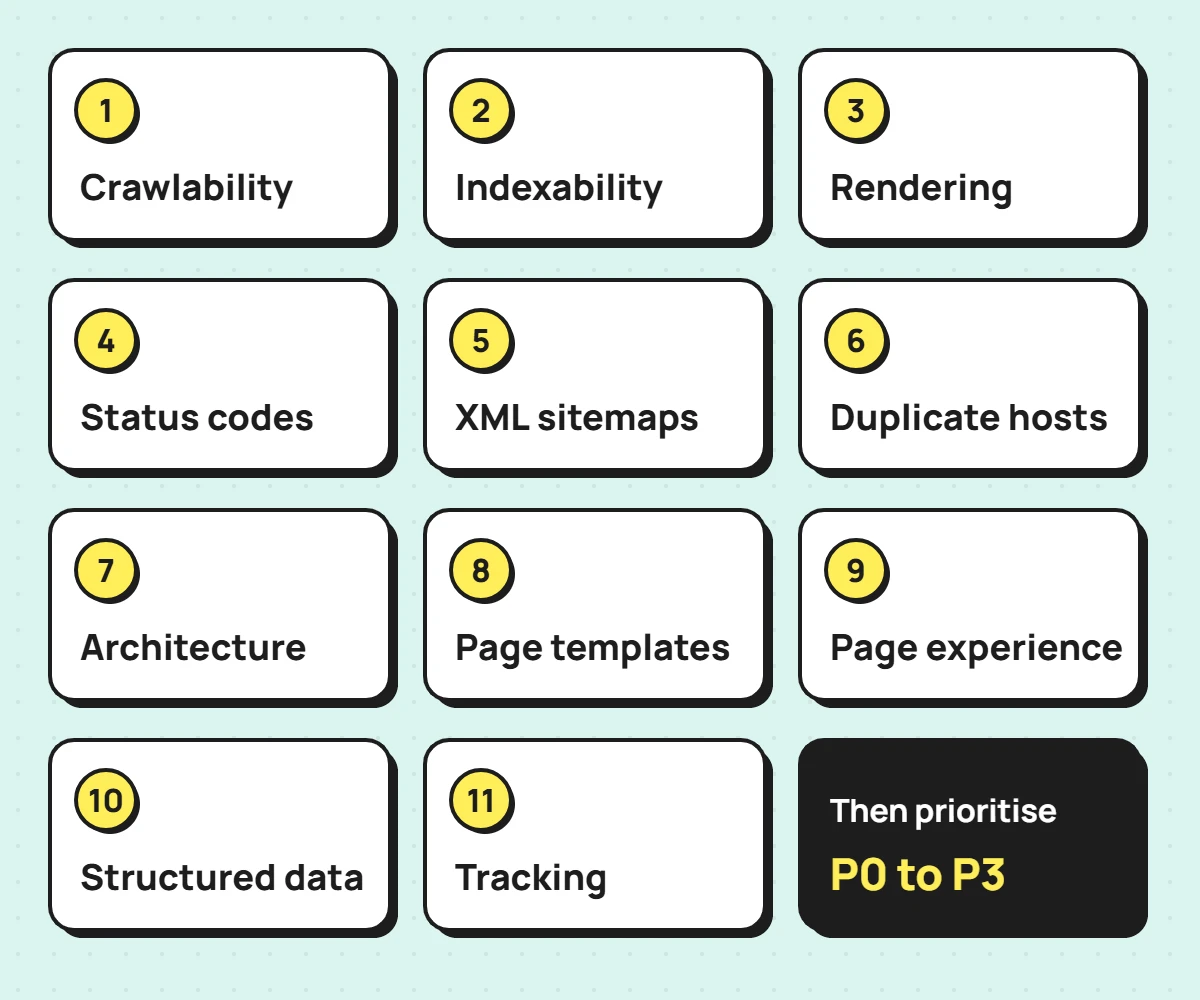
1. Crawlability
- robots.txt does not block important pages, or the CSS and JavaScript they need
- Important pages are reachable through normal links, within a few clicks of the homepage
- No important page is an orphan, linked only from the sitemap
- Filters, sorting and search pages are not creating thousands of crawlable URLs
2. Indexability
- No important page carries noindex, in the HTML, in an HTTP header, or added by JavaScript
- Canonical tags point to the page itself or to the true preferred version
- Duplicate and parameter URLs consolidate to one canonical
- The Page indexing statuses make sense for each page type
Read the statuses carefully before treating them as errors. In Google’s Page indexing report, “Crawled, currently not indexed” means Google fetched the page but chose not to index it for now, and “Discovered, currently not indexed” means Google knows the URL but has not crawled it yet. “Page with redirect” is expected for URLs you redirected on purpose.
3. Rendering and JavaScript
- Main content, links and titles appear in the rendered HTML in the URL Inspection tool
- Links are real links with an href, not click handlers
- The original HTML does not carry a noindex you expect JavaScript to remove
Google notes that when it finds noindex it may skip rendering, so removing a noindex with JavaScript may not work. On JavaScript sites, check what Google sees in the rendered HTML, not what the source code suggests.
4. Status codes and redirects
- Important pages return 200; removed pages return 404 or 410
- No soft 404s: pages that return 200 but are empty or show an error
- Redirects are permanent (301 or 308) and go to the final URL in one hop
- Internal links point to final URLs, not to redirects
5. XML sitemaps
- The sitemap loads, and is listed in robots.txt and submitted in Search Console
- It contains only canonical, indexable URLs that return 200
- It is re-tested after plugin, theme or permalink changes
That last check sounds fussy until it happens. On this site, turning on a redirect module reset WordPress’s rewrite rules and every sitemap URL started returning 404. Nothing on the pages looked wrong. Re-saving the permalink settings fixed it in seconds, but only because the sitemap was re-tested straight away.
6. Duplicate hosts and copies of the site
- http, https, www and non-www all resolve to one version in a single redirect
- Staging, preview and temporary hosting addresses are not indexable copies of the site
Temporary addresses are easy to forget. This site’s preview domain from the build stayed online with its own canonical tags after launch. It was settled by sending a noindex header on that hostname only, then confirming the live pages stayed indexable, including when served from cache.
7. Site architecture and internal links
- Important pages sit in a clear hierarchy (hub, then child pages), with breadcrumbs
- Pages link to each other inside the body copy, not only through menus
- Anchor text describes the target page; “read more” and “click here” are rare
When I audited this site, “Read the case study” was used as link text 14 times. Each one now names the case it points to, which helps both readers and search engines understand the link.
8. Page templates: titles, descriptions and headings
- Every indexable page has a unique, descriptive title and one H1
- Titles put the main topic first and are not routinely cut off in results
- Meta descriptions exist on important pages and match the content
Google has no character limit for titles, but it truncates title links to fit the device width and may rewrite titles that do not reflect the page. Treat length as a readability check, not a rule. On this site, 11 titles were long enough to be cut off and were rewritten with the main term first.
9. Page experience
- Core Web Vitals in field data: Largest Contentful Paint within 2.5 seconds, Interaction to Next Paint under 200 milliseconds, Cumulative Layout Shift under 0.1 (Google’s recommended thresholds)
- Pages work on a phone without sideways scrolling or blocking pop-ups
- Every page is served over HTTPS
10. Structured data
- Markup matches what is visible on the page
- Sitewide entities (organisation or person, website) appear once and consistently
- Changes to SEO plugin defaults are tested on a live page before and after
Plugin defaults deserve that last check. On this site, every page was marked up as an Article. Switching the plugin’s default to “none” looked like the tidy fix, but it also removed the person, website and web page markup. Testing the output straight away caught it, and the change was reverted in minutes.
11. Tracking
- Search Console is verified for the whole domain
- Analytics counts real outcomes: form submissions, bookings and purchases
- Campaign links keep their UTM tags all the way to the landing page
Tracking belongs in a technical audit because every later decision depends on it. On one B2B site, analytics counted every visit to the contact page as a lead, so the lead numbers were inflated before any SEO work began.
How to prioritise audit findings
Give every finding a priority based on business impact, not on how alarming the tool makes it look. This is the scale I use:
| Priority | Meaning | Typical example |
|---|---|---|
| P0 | A blocker or severe risk: fix now | Important pages blocked from indexing, or a release that is losing traffic |
| P1 | High impact: this or the next work cycle | Broken redirects from pages that had links and traffic |
| P2 | Moderate impact: schedule after P0 and P1 | Generic anchor text, titles cut off on key pages |
| P3 | Low impact: when there is capacity | Missing alt text on decorative images |
Alongside the priority, record the evidence, how confident you are, the effort, the risk of the fix, who owns it, and how you will confirm it worked. A finding without evidence and an owner tends to stay on the list forever.
Findings that look serious but are not
Part of an audit is knowing what to leave alone.
A drop in known pages that needed no fix
On a Shopify store I work on, the “All known pages” count in Search Console fell sharply over a few weeks. It looked like an indexing problem. The breakdown showed indexed pages were flat or rising, and the drop came from the “Crawled, currently not indexed” group shrinking from about 565 URLs to 64 as Google pruned feeds, sitemaps, assets and parameter URLs. No action was needed, and no development time was spent on it.
Other common false alarms
Expect these as well: “Page with redirect” on URLs you redirected deliberately, “Alternate page with proper canonical tag” on parameter URLs, and crawler warnings about pages you never wanted indexed.
What a useful audit deliverable looks like
The output should be a fix list, not a crawler export. Each item states the issue, the evidence, the priority, the fix in terms a developer can act on, the owner, and the check that confirms it worked. The P0 and P1 items should fit on one page.
If you would rather have this done for you, my technical SEO audit delivers exactly that fix list, with a walkthrough call and QA after release. If a redesign or platform change is coming, the SEO migration checklist covers what to check before and after launch, and the wider technical SEO services page explains the rest.
Frequently asked questions
How often should you run a technical SEO audit?
Run a full audit before and after any redesign or platform change, and a lighter check every few months. Search Console’s indexing and crawl reports are worth a monthly look on any site that depends on search.
Can I do a technical SEO audit with free tools?
Largely, yes. Search Console, the URL Inspection tool, PageSpeed Insights and a crawler’s free tier cover most small sites. Larger sites benefit from a full crawler licence and access to server logs.
How long does a technical SEO audit take?
Site size matters less than the number of distinct templates, because each template is checked once and then sampled. A small brochure site can be done in a few days. A large store or a JavaScript application takes longer, mostly because rendering and crawl paths need more testing.