“Crawled, currently not indexed” means Google fetched the page and decided not to add it to its index, at least for now. Google’s own Page indexing report help says the page “may or may not be indexed in the future” and that there is no need to resubmit it. Before you fix anything, find out which URLs are in the list. On many sites most of them are feeds, sitemap files, parameter URLs or thin pages that never needed indexing. Only the important pages in the list need work, and the work is usually about making them more useful and better linked, not about requesting indexing again.
Crawled vs discovered: what each status means
| Status | What happened | What it usually points to |
|---|---|---|
| Crawled, currently not indexed | Google fetched the URL and chose not to index it | A value or priority decision: thin, duplicate or low-priority URLs |
| Discovered, currently not indexed | Google knows the URL but has not fetched it yet | Crawling was postponed, often because Google expected it to overload the site, or the URL has few links pointing to it |
Both are “not indexed”, and Google is clear that not indexed is not necessarily bad. It does not expect every URL on a site to be indexed. The question is only whether your key pages are.
Step 1: Sort the URLs before you fix anything
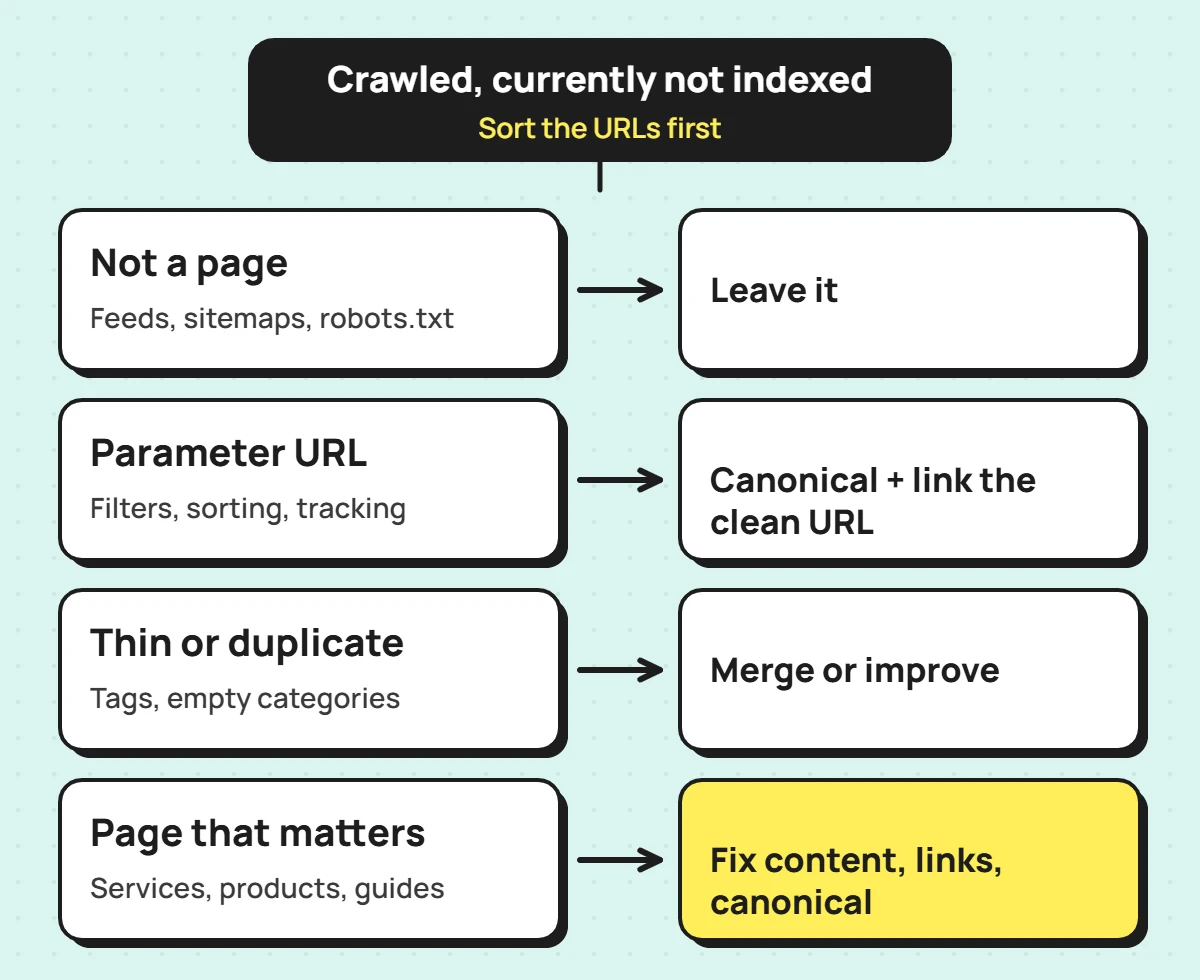
Open the status in the Page indexing report, export the example URLs, and sort them by type. Each type has a different answer:
| URL type | Examples | What to do |
|---|---|---|
| Files that are not pages | Sitemaps, robots.txt, llms.txt, RSS or Atom feeds, CSS files | Nothing. These do not belong in the index |
| Parameter and filter URLs | Sorting, filtering, tracking or pagination parameters | Make sure the clean version is canonical and linked internally; leave the rest |
| Thin or near-duplicate pages | Tag archives, empty categories, pages that repeat another page | Merge, improve or accept that they stay out |
| Pages that matter | Service, product, category pages and guides you want found | Work through Step 3 |
Most of the panic about this status comes from skipping this step. A big number in the report says very little until you know what it is made of.
Step 2: Read the trend, not just the total
The total moves for reasons that have nothing to do with your site, so look at how it moved and what moved with it. Two diagnoses from a Shopify store I work on show the difference.
When the number falls and nothing is wrong
Between late July and early October 2026, the store’s known but not indexed URLs fell from roughly 2,250 to 1,780. Indexed pages stayed level, at around 470 to 482. Most of the drop sat in “Crawled, currently not indexed”, which shrank from about 565 URLs to 64. The URLs still listed there were sitemap files with parameters, robots.txt, llms.txt, blog and collection feeds, and one odd nested product URL.
Two details settled it. A sister store on the same platform showed steps on exactly the same dates (22 August, 29 August, 5 September, 22 September and 5 October), which points to how the report refreshes, not to anything either site did. And the report does not list URLs once they leave it, so the only sensible reading was Google tidying up non-page URLs it had once seen. No pages were lost, and no fix was needed.
When the number falls and something did change
The same week, the “All submitted pages” view showed a sharper fall: from about 465 submitted and indexed URLs to 202 indexed. That looked worse, but the full list told a different story. Around 255 blog articles were still indexed. They had simply stopped counting as “submitted”.
The cause was a platform change. Shopify had moved blog articles out of the blog sitemap into a new child sitemap for articles. Google re-read the old blog sitemap, found the articles gone, and had not yet credited the new one. The articles were never at risk. The fix is to submit the new articles sitemap directly in Search Console, so the submitted view matches reality again.
Both cases started as a scary drop on a chart, and neither needed a single page to change. That is common. Check the indexed count and the URL types first, every time.
Step 3: Fix the pages that matter
If an important page is in the list, work through these checks in order:
- Is it different enough? Compare it with your other pages on the same topic. If two pages answer the same question, Google may index one and leave the other. Merge them or give each its own angle; see how to find and fix keyword cannibalization.
- Is it useful on its own? Thin pages, such as a product with a one-line description or a category with two items, are the usual candidates. Add the detail a visitor would actually need.
- Is it linked? Pages linked only from the sitemap send a weak signal. Link to them from relevant pages in your main content.
- Is the canonical right? The page should point to itself, not to a similar page or an old URL.
- Does Google see the content? Use URL Inspection and look at the crawled page. On JavaScript sites the HTML Google gets can differ from what your browser shows; see React and JavaScript SEO.
Once the page has genuinely changed, request indexing for it in URL Inspection. If you fixed a pattern across many pages, use the report’s Validate fix button instead. Google says validation typically takes up to about two weeks and sometimes longer.
What not to do
- Do not resubmit the whole list. Requesting indexing for unchanged pages does not change Google’s decision, and the daily quota is small.
- Do not delete pages because they are in the list. Check traffic and links first; a merge with a redirect is usually better.
- Do not add noindex in bulk to make the number go down. It hides the symptom and can remove pages you need.
- Do not pay for “instant indexing” services. Google’s Indexing API is limited to job postings and livestream pages, not general content.
If your pages are “Discovered, currently not indexed”
This is a crawling question rather than a quality one. On a small or new site it usually means Google has not got round to the pages yet, or they have few internal links. Link to them from pages Google already crawls and keep them in the sitemap. On a large site, check server response times and whether thousands of low-value URLs, such as filter combinations, are using up crawling. If a fast, well-linked important page stays discovered for weeks, treat it like Step 3.
Indexing problems are one part of a wider check; the technical SEO audit checklist covers the rest. If you would rather have someone diagnose it for you, my technical SEO audit starts with exactly this kind of report reading, before any crawler runs.
Frequently asked questions
Does “Crawled, currently not indexed” hurt the rest of my site?
Not by itself. It is a status for individual URLs. A large share of thin or duplicate pages can be a sign the site needs consolidation, but the status is not a penalty.
How long until a fixed page gets indexed?
There is no fixed time. An improved, well-linked page is often picked up within days to a few weeks of being recrawled. If nothing changes after a month, look again at how it differs from your similar pages.
Should I remove these URLs from my sitemap?
Remove anything that should not be indexed at all, such as redirects, noindexed pages and parameter URLs. Keep important pages in the sitemap while you improve them.